CREATEVISION AI · PRACTICAL VIDEO GUIDES
Before you start
01Keep the product as the fixed reference and vary one camera, lighting or background choice.
02A front photo cannot verify the unseen back or demonstrate an unobserved mechanical function.
03These are shot prompts. Assemble selected clips with approved copy to make a complete ad.
Prepare the source before choosing a shot
Use a clear photo showing the surface you intend to feature. Keep the silhouette, cap, label and proportions easy to identify. Use another approved view if a camera move would reveal a hidden surface.
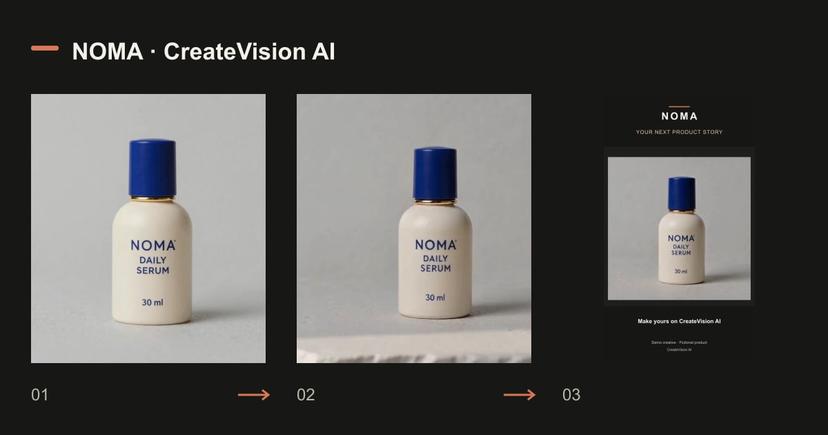
Our source is a fictional product created for demonstrations, not a customer brand or a proven skincare product. References, output and prompts are supplied so you can repeat the composition with your own item.
Opening shots: reveal the product
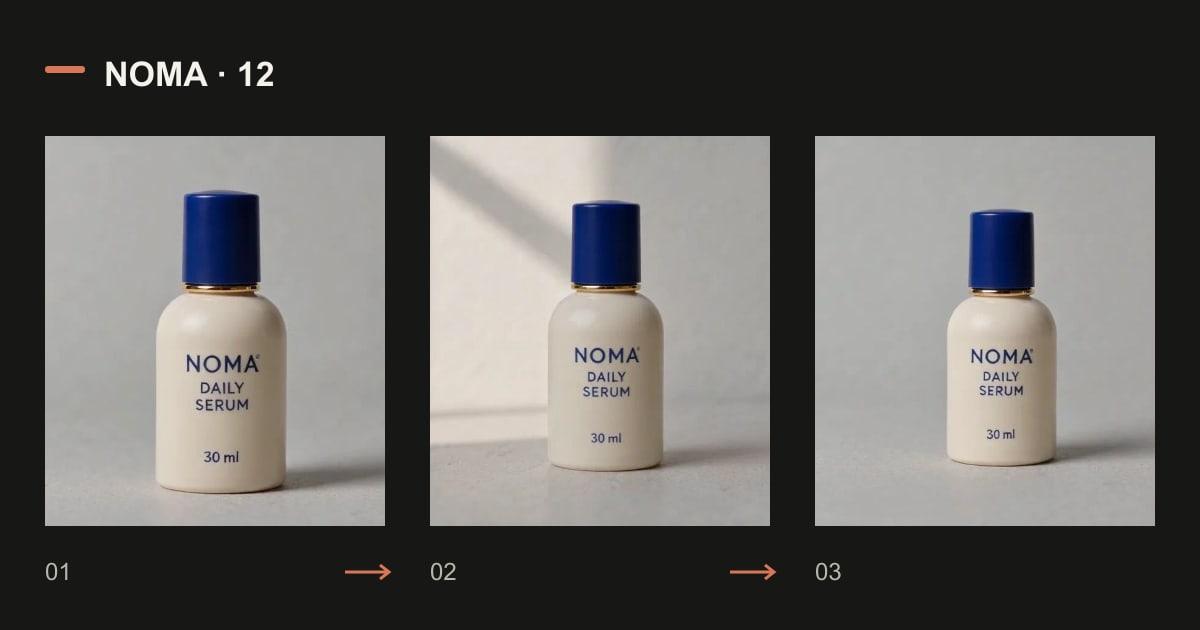
A forward push, a foreground reveal, a light sweep and a detail-to-full move provide four different openings. Start with the least movement your message needs. The original outputs below let you see where a proposed shot actually changes the source.
Read the original prompt
Use the uploaded product photograph as the identity reference. Slow forward push from a full bottle view to a closer hero view. One continuous 5-second shot. Preserve the bottle shape, ivory body, cobalt cap, brass collar, label NOMA / DAILY SERUM / 30 ml and proportions. No hands, no unseen surfaces, no new claims, no added text.
Read the original prompt
Use the uploaded product photograph as the identity reference. A soft foreground blur slides away to reveal the bottle; the camera stays still. One continuous 5-second shot. Preserve the bottle shape, ivory body, cobalt cap, brass collar, label NOMA / DAILY SERUM / 30 ml and proportions. No hands, no unseen surfaces, no new claims, no added text.
Read the original prompt
Use the uploaded product photograph as the identity reference. A narrow light sweep reveals the bottle silhouette on the same plain background. One continuous 5-second shot. Preserve the bottle shape, ivory body, cobalt cap, brass collar, label NOMA / DAILY SERUM / 30 ml and proportions. No hands, no unseen surfaces, no new claims, no added text.
Read the original prompt
Use the uploaded product photograph as the identity reference. Slowly move from a close view of the visible cap to the full bottle without changing its angle. One continuous 5-second shot. Preserve the bottle shape, ivory body, cobalt cap, brass collar, label NOMA / DAILY SERUM / 30 ml and proportions. No hands, no unseen surfaces, no new claims, no added text.
Loading an example fills a draft. Review the settings and current quote before generating.
Detail shots: light and focus
Use controlled lighting or a focus change to emphasize visible material and the cap. Keep the object still. If the label bends, the cap changes shape or a new surface appears, reduce movement before trying again.
Read the original prompt
Use the uploaded product photograph as the identity reference. Keep the camera locked while a soft highlight passes over the visible ceramic surface. One continuous 5-second shot. Preserve the bottle shape, ivory body, cobalt cap, brass collar, label NOMA / DAILY SERUM / 30 ml and proportions. No hands, no unseen surfaces, no new claims, no added text.
Read the original prompt
Use the uploaded product photograph as the identity reference. A gentle focus change from the cobalt cap to the front label, with the bottle fully still. One continuous 5-second shot. Preserve the bottle shape, ivory body, cobalt cap, brass collar, label NOMA / DAILY SERUM / 30 ml and proportions. No hands, no unseen surfaces, no new claims, no added text.
Loading an example fills a draft. Review the settings and current quote before generating.
Context shots: change the surroundings
A window, shelf or desk can give the same item a different visual setting. Those settings communicate context, not evidence that a product has a specific benefit. Compare geometry and color with the original image after changing the background.
Read the original prompt
Use the uploaded product photograph as the identity reference. Place the unchanged bottle on a clean pale stone tabletop beside a softly blurred window; only daylight shifts. One continuous 5-second shot. Preserve the bottle shape, ivory body, cobalt cap, brass collar, label NOMA / DAILY SERUM / 30 ml and proportions. No hands, no unseen surfaces, no new claims, no added text.
Read the original prompt
Use the uploaded product photograph as the identity reference. Place the unchanged bottle on a minimal bathroom shelf; the camera makes a very small forward push. One continuous 5-second shot. Preserve the bottle shape, ivory body, cobalt cap, brass collar, label NOMA / DAILY SERUM / 30 ml and proportions. No hands, no unseen surfaces, no new claims, no added text.
Read the original prompt
Use the uploaded product photograph as the identity reference. Place the unchanged bottle on a tidy wooden desk with the background softly blurred; fixed front-facing view. One continuous 5-second shot. Preserve the bottle shape, ivory body, cobalt cap, brass collar, label NOMA / DAILY SERUM / 30 ml and proportions. No hands, no unseen surfaces, no new claims, no added text.
Loading an example fills a draft. Review the settings and current quote before generating.
Closing shots: leave space for the next action
A left-aligned product, a centered hero hold and a restrained return to the opening framing can support an end card. Add exact prices, dates and the final CTA as editable copy after generation. The loop prompt is a candidate: inspect the seam instead of assuming a perfect loop.
Read the original prompt
Use the uploaded product photograph as the identity reference. Keep the bottle to the left of frame with empty clean background on the right for copy added later; slow camera pullback. One continuous 5-second shot. Preserve the bottle shape, ivory body, cobalt cap, brass collar, label NOMA / DAILY SERUM / 30 ml and proportions. No hands, no unseen surfaces, no new claims, no added text.
Read the original prompt
Use the uploaded product photograph as the identity reference. Hold the bottle centered and motionless, with a gentle lighting change and generous space above it for later copy. One continuous 5-second shot. Preserve the bottle shape, ivory body, cobalt cap, brass collar, label NOMA / DAILY SERUM / 30 ml and proportions. No hands, no unseen surfaces, no new claims, no added text.
Read the original prompt
Use the uploaded product photograph as the identity reference. A tiny forward camera move then return to the starting framing, ending with the unchanged bottle still; a simple loop candidate. One continuous 5-second shot. Preserve the bottle shape, ivory body, cobalt cap, brass collar, label NOMA / DAILY SERUM / 30 ml and proportions. No hands, no unseen surfaces, no new claims, no added text.
Loading an example fills a draft. Review the settings and current quote before generating.
Build an ad from the clips that pass review
Choose an opening, one useful detail or context shot, and a closing. Match color and framing, then add approved copy and sound. A complete ad does not require all twelve shots.
For fewer manual choices, use Marketing Studio: choose your product, presenter and format, review the keyframe when using the two-stage pipeline, then generate. Check the product before committing more credits to motion.
Review with a product checklist
Compare the original and the result at the beginning, middle and end. Look for label drift, a cap that grows, changed proportions, an invented accessory or a camera move that reveals a made-up back.
The examples show first requests rather than a promise that every prompt is ready for publication. Keep the usable clips, simplify the ones that miss the reference, and set an attempt budget before refining.
Questions before generating
Can I use any of these as a complete ad?
Each prompt produces a shot. Select and assemble the clips that support your message, then add accurate editable copy and a CTA.
Do these prompts guarantee an unchanged label?
No. They state the intended constraint. Inspect the actual result and add critical exact text in a controlled design step if needed.
Does a prompt work with every model?
No. Use the shown model and settings as a reproducible starting point, then adapt to another model’s supported workflow.
Compare plans and credit packs
Know the volume you need? Compare membership credits with a one-time credit pack before choosing. Your draft stays under your control.