Seedream 5 AI Image Generator

ByteDance's Seedream 5 Lite line, tuned for photoreal skin and light rather than layouts. Web search grounds real subjects by default. No API key, no +86 phone.

0 / 2,000
~50 cr

What is Seedream 5?

Seedream 5 is the Lite line of ByteDance's Seedream 5 generation — same family as Seedream 5 Pro, but tuned for everyday photoreal work rather than dense design layouts. It runs here as doubao-seedream-5.0-lite, handles text-to-image and image-to-image, and can look your prompt up on the web before generating.

The gaps are specific. It tops out at 3K — there is no 4K, so print at size means Seedream 4.5. Five reference images is the ceiling, against 14 on 4.5. Web search is on by default and adds 10 credits per run, wasted on prompts naming nothing real — switch it off in the input bar. And everything we have run here is photographic: we make no claim on text or layouts.

Seedream 5 is the Lite line of ByteDance's Seedream 5 generation, and photorealism is what it is for: visible skin detail, natural catchlights, believable light falloff, 2K and 3K output, and an optional web-search step. Every image below was generated here on 15 August 2026, first take, with the exact prompt shown.

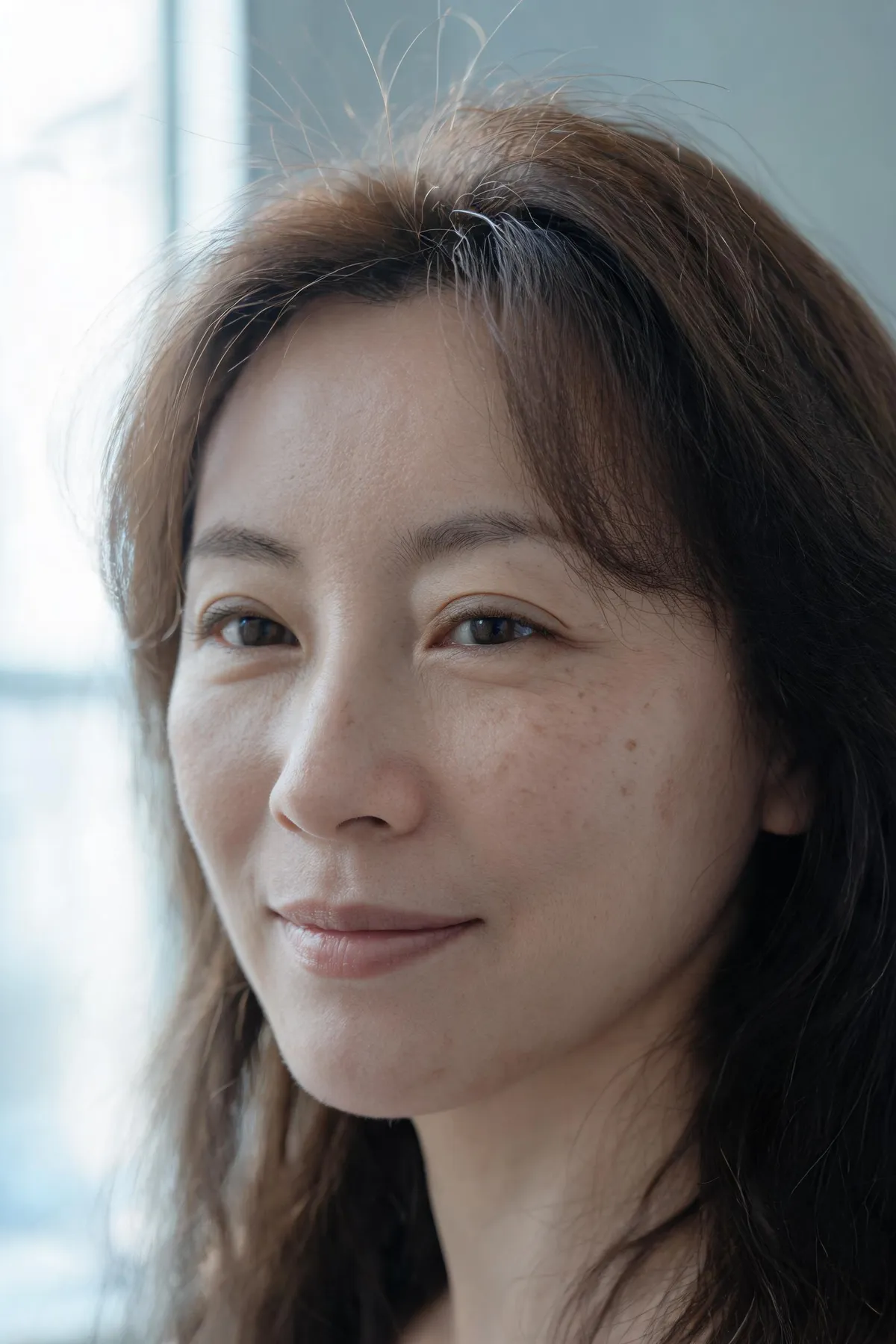
Seedream 5 portrait of a woman by a north-facing window with visible pores and fine lines around the eyes

Skin and faces that read as photographs

Visible pores, natural catchlights, subtle subsurface scattering — community reviews consistently rank the Seedream line first for moving past the "airbrushed AI look". Portraits come back looking shot, not rendered, which is why photographers and brands reach for it for people-centric work. The portrait beside this is a first take at 2K in 35 seconds: the prompt asked for no makeup, fine lines around the eyes and honest unretouched photographic texture, and that is what came back — not a smoothed version of it.
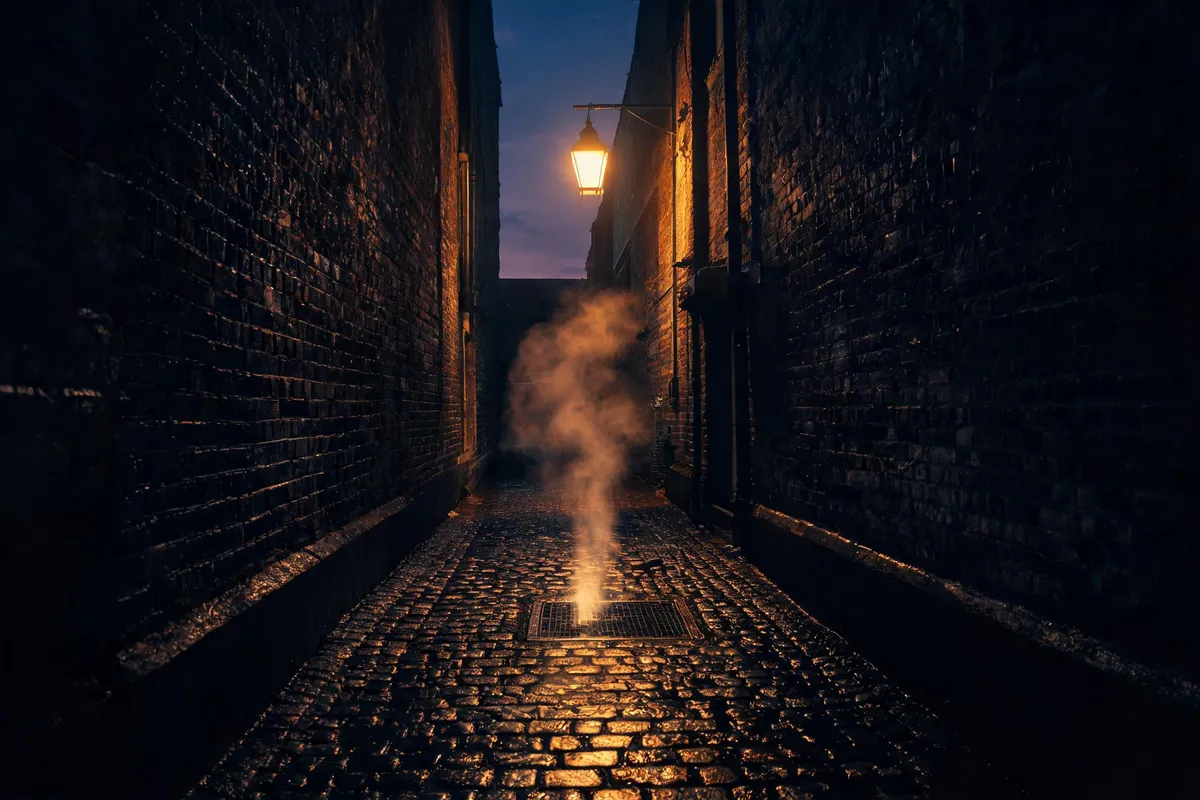
Seedream 5 rain-wet cobblestone alley at dusk lit by a single sodium streetlamp, steam rising from a grate

Cinematic lighting and material truth

Fabric, metal, glass, and organic surfaces render with camera-accurate texture; shadows and depth of field behave like real optics. Seedream 5 handles dramatic, directional light — golden hour, rim light, candlelight — without collapsing into illustration. The alley beside this is a first take at 2K in 30 seconds from a single-source lighting brief: one sodium streetlamp, a warm pool on wet stone, damp brick, steam off a grate, and everything past the pool falling into real shadow rather than a flat grey wash.

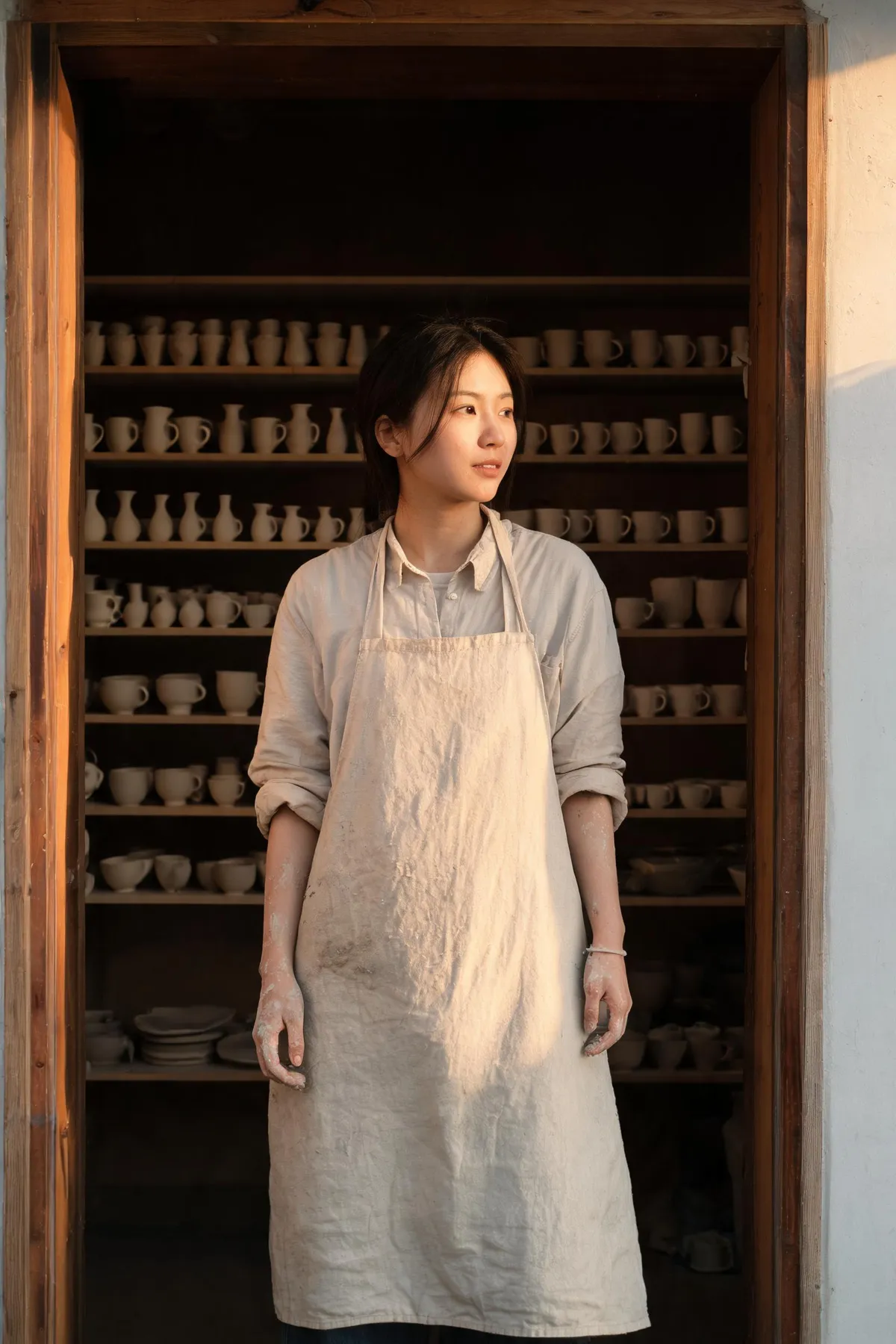
Seedream 5 editorial portrait of a ceramicist in a linen apron in her studio doorway in late afternoon side light

Editorial and documentary setups, followed clause by clause

Attach up to five reference images to hold a subject, product, or location steady across a photoreal set. That reference limit is a registry fact rather than something we measured here — what the image beside this does show is how a long location brief survives the trip. Linen apron, studio doorway, late-afternoon side light, shelves of unglazed bisqueware behind her, documentary framing, no retouching: six clauses, all present, first take at 2K in 34 seconds. That is the property that makes a shot list worth writing.

Real Seedream 5 outputs from this workspace

Generated here on 15 August 2026, first take, exact prompts shown — no retouching and no cherry-picking. Each image targets one of the capabilities claimed further down this page. Generation took 30s, 34s and 35s.

Seedream 5 case demonstrating: Skin and faces that read as photographs
Prompt2K · 2:3 · 35s

Close portrait of a woman in her thirties by a north-facing window, no makeup, visible pores and fine lines around the eyes, a few flyaway hairs catching the light, soft even daylight, honest unretouched photographic texture, 85mm lens, shallow depth of field.

Seedream 5 case demonstrating: Cinematic lighting and material truth
Prompt2K · 3:2 · 30s

A rain-wet cobblestone alley at dusk lit by a single sodium streetlamp, warm pool of light falling across the stones, brick walls holding the damp, steam rising from a grate, deep shadow at the frame edges, anamorphic film still, believable light falloff.

Seedream 5 case demonstrating: Reference-guided photoreal series
Prompt2K · 2:3 · 34s

Editorial photograph of a ceramicist in a linen apron standing in her studio doorway, late afternoon side light, shelves of unglazed bisqueware behind her, natural skin tone and fabric texture, documentary style, no retouching.

Who Seedream 5 is for

It is a photorealism specialist. These are the jobs where that specialisation is the whole point — and the one where it is the wrong tool.

  • Photographers and retouchers

    Skin that keeps its pores and its fine lines instead of being smoothed into plastic. Our three runs were all first takes from prompts that explicitly asked for unretouched texture, and none of them argued back.

  • Brand and e-commerce teams shooting on location

    Environmental setups — a doorway, a workshop, a wet street at dusk — hold their light and their materials. Attach up to five references to keep a product or a location steady across the set.

  • Anyone whose prompt names something real

    The web-search step looks up real products, places, and styles before generating, which is the difference between a plausible object and the right one. It is on by default; switch it off when your prompt is pure invention and you are paying for nothing.

  • People who want variants, not one shot

    Up to four images in a single run, billed per image. Useful when you are choosing a frame rather than fixing one.

  • Not for: typography, dense layouts, or 4K print

    We have not tested this model on in-image text or multi-element layouts, and its top tier is 3K. For posters, packaging and small type go to GPT Image 2 or Seedream 5 Pro; for a genuine 4K tier, Seedream 4.5. Both of those pages show their own measured results rather than ours.

Seedream 5 next to the models people compare it with

Same workspace, same subscription — switching between any of these is one click.

Seedream 5Seedream 5 ProSeedream 4.5GPT Image 2
Upstream modeldoubao-seedream-5.0-litedoubao-seedream-5.0-prodoubao-seedream-4.5gpt-image-2
Credits per image40 at 2K and 3K50 at 1K · 100 at 2K40 at 2K and 4K5 to 560, by resolution × quality; +10 per reference image
Quality tiers2K, 3K1K, 2K2K, 4K1K, 2K, 4K
Reference imagesUp to 5Up to 5Up to 14Up to 16
Images per runUp to 4OneUp to 4Up to 10
Web search groundingYes — on by default, +10 credits per runNoNoNo
Our measured speed30s, 34s, 35s at 2K — 3 runs on 15 August 2026Not measured in this batchNot measured in this batchNot measured in this batch

Upstream model ids, credit costs, quality tiers, reference-image limits, batch sizes and the web-search surcharge are read from our own model registry on 20 August 2026 — not from vendor pages. GPT Image 2 prices from a resolution × quality matrix, so its per-image figure is a range and the reference-image surcharge is added before the batch multiplier. Speeds are our own measurements with the sample size stated; cells we did not run in this batch say so rather than borrowing a number from somewhere else.

More Image Models Like Seedream 5

Compare Seedream 5 with other image models — same workspace, one click to switch.

Seedream 5 specs on CreateVision AI

ModelSeedream 5, the Lite line of ByteDance's Seedream 5 generation — runs here as doubao-seedream-5.0-lite
ModesText-to-image and image-to-image, including reference-guided generation
Quality tiers2K and 3K
Aspect ratios10 presets — 1:1, 3:2, 2:3, 4:3, 3:4, 4:5, 5:4, 16:9, 9:16, 21:9 — plus auto
Images per runUp to 4; credits are charged per image
Reference imagesUp to 5 per generation
Web search groundingSupported and switched on by default; adds a surcharge per run rather than per image, shown before you generate
Output formatJPEG
Credits2K and 3K cost the same, so there is no cost reason to stay at 2K; web search is the only optional surcharge
Measured speed30s, 34s and 35s at 2K — our 3 generations on August 15, 2026

How to Use Seedream 5

Three steps from a blank prompt box to a finished image.

  1. 1

    Select Seedream 5

    Open the model picker and choose Seedream 5. The panel shows its credit cost, resolution options, and aspect ratios before you spend anything.

  2. 2

    Describe what you want

    Write the subject, setting, lighting, and finish. Attach reference images if the model accepts them.

  3. 3

    Generate, then keep going

    Download the result, or continue — edit it, restyle it, upscale it, or animate it into video. Every generation keeps its prompt and parameters.

Beyond Seedream 5

One account, the full image and video generation workflow.

Seedream 5 Pricing and Free Daily Credits

Run Seedream 5 on the free tier's daily credits, or upgrade for premium models, faster generation, and 4K output.

Free

$0

Perfect for getting started

  • 200 welcome credits, up to 80/day
  • Z Image Turbo drafts at 0 credits
  • Standard generation speed
  • Generation history included
Get Started

Premium

Most popular
$29/month

Billed annually · $240/year

  • 8,000 credits/month, no daily limits
  • All premium models — GPT Image 2, Nano Banana, Seedream, Seedance, Veo, Kling
  • 5x generation speed, priority queue
  • AI prompt enhancement
Upgrade to Premium

Ultimate

$49/month

Billed annually · $380/year

  • 18,000 credits/month, no daily limits
  • HD generation up to 4K resolution
  • Priority support
  • Fastest queue and early access to new models
Upgrade to Ultimate

Seedream 5 — Frequently Asked Questions

1

What is Seedream 5 best at?

Photorealism — especially skin, faces, materials, and dramatic lighting. Community comparisons consistently place the Seedream line at the top for photoreal quality.

2

What resolutions does Seedream 5 support?

2K and 3K output, suitable for crops, large displays, and print work. Both tiers cost the same here, so there is no cost reason to stay at 2K. Options appear in the generator before each run.

3

What does web search do?

When enabled, the model looks up real-world subjects in your prompt before generating, improving accuracy for real products, places, and styles. On Seedream 5 it is switched on by default and adds a surcharge per run — not per image — shown before you generate. Turn it off in the input bar for prompts that name nothing real.

4

How much does it cost?

The exact credit cost — including the web-search option and the number of images in the batch — is always displayed before you generate. Credits refresh daily and monthly with your plan.

5

Seedream 5 vs GPT Image 2?

Seedream 5 wins on photoreal rendering; GPT Image 2 wins on in-image text and complex layout instructions. Many workflows draft with one and finish with the other.

6

Seedream 5 vs Seedream 5 Pro?

Same generation, different jobs. Seedream 5 is the Lite line: 2K and 3K, batches of up to four, an optional web-search step, and fewer credits per image. Pro is tuned for design work — dense layouts and editorial typography — renders at 1K and 2K, and runs one image at a time.

7

Can I use reference images?

Yes — up to five per generation, to hold a subject or style steady across a photoreal series. If you need more references in one pass, Seedream 4.5 takes 14.

Shoot your next photoreal set with Seedream 5

Shoot your next photoreal set with Seedream 5

Start Generating Images

Discover our one-click AI image tools

One-click tools for everything around generation — polish, restyle, and share.

Pricing & Access — The FactsSeedream 5

Model
Seedream 5
Developer
ByteDance
Access
Runs in the CreateVision AI workspace via API — sign in and generate. No API key, no cloud project, no software install.
Price per generation
From 40 credits ≈ $0.15 per image on the Premium plan ($29/month for 8,000 credits). The free plan includes 80 credits every day.
Privacy
Private by default — no other user can see your generations, on any plan. We don't sell or misuse member data. Privacy Policy

What's newSeedream 5

  1. Update

    Refreshed this page with free-access guidance and our Seedream 5 Pro test data; complete guide re-published.