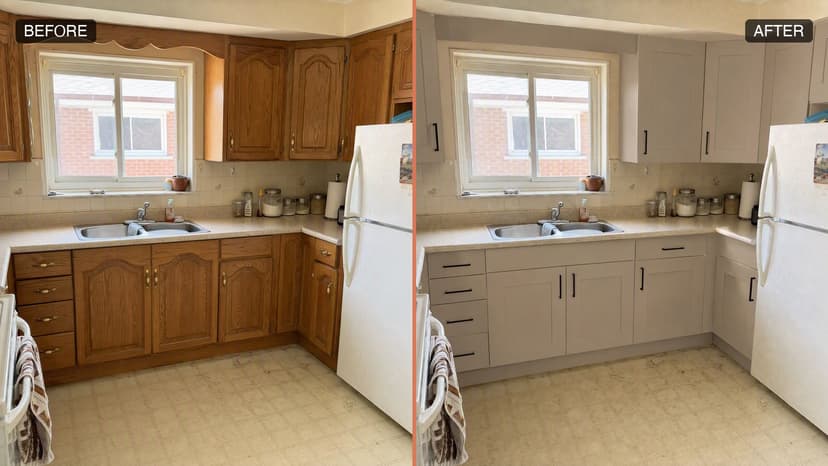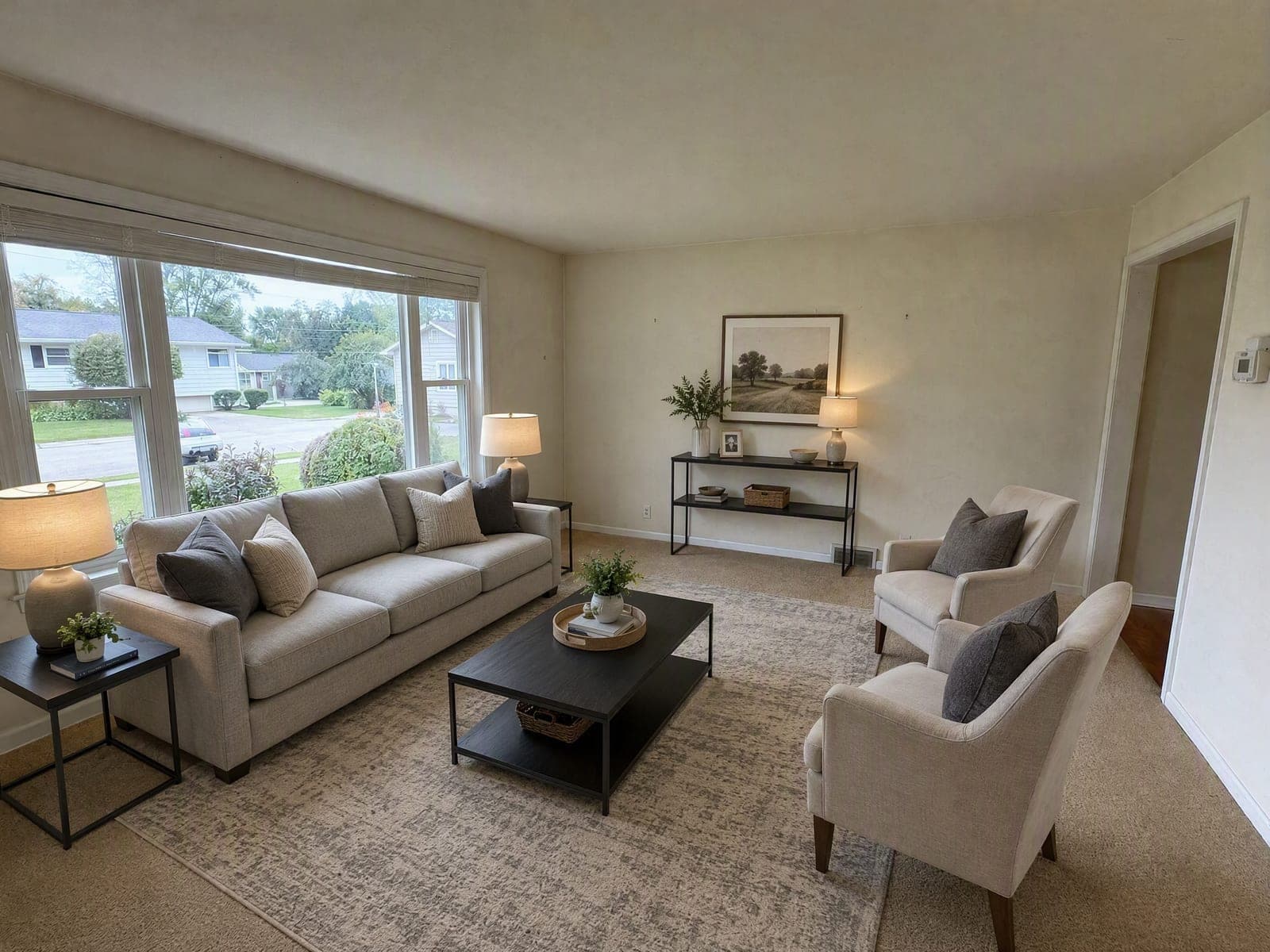
The rule is not “don't stage” — it's “don't hide that you staged”
Virtual staging is legal, normal and, in most markets, expected. Nobody's board is going to sanction you for putting a sofa in an empty living room.
What gets agents in trouble is quieter than that. It is the photo where the damp patch went away. The one where the cracked tile came back whole. The one where the window got a little wider because the model thought the composition would balance better. None of those were decisions the agent made — the tool made them — but the listing has the agent's name on it.
This page is the practical version: where the line actually sits, the three ways boards accept as disclosure, what changed in California on 1 January 2026, and what enforcement looks like in reality rather than in the headlines. It is not legal advice, and your board's handbook always wins over anything written here.
Where the line sits: furniture yes, property no
Every board writes it slightly differently, but the common denominator across the ones that publish clear guidance is easy to remember:
If a mover could carry it out of the room, you may add or remove it. If it is part of the property, you may not touch it.
That single sentence resolves most of the cases agents actually run into.
Generally accepted
- •Adding furniture, rugs, lamps, artwork and plants to an empty room
- •Replacing the seller's furniture with neutral pieces of similar footprint
- •Removing furniture so buyers can read the layout
- •Removing clutter, laundry, cables, worktop appliances and personal photographs
- •Ordinary photographic corrections: exposure, white balance, straightening verticals, lens distortion
Treated as misrepresentation
- •Repairing cracks, damp, water stains, mould or damaged flooring
- •Repainting or resurfacing walls, ceilings or floors
- •Adding, removing, moving or resizing a window, door or wall
- •Changing the view out of the window — swapping a car park for trees
- •Making a dated or broken fixture look new or functional
- •Adding grass, removing power lines, or otherwise improving the exterior
The awkward cases sit in the middle, and they are worth thinking about before you publish rather than after a buyer complains. Digitally removing a tenant's pile of boxes is fine. Digitally removing the water stain those boxes were sitting under is not — even though both are “tidying up”, and even though the same one click did both.
A tool that refuses to cross that line
Our virtual staging model is instructed to leave every existing defect visible, and there is no setting that turns it off — so the compliant version is the only version it can produce.
How to disclose: three accepted methods
Boards differ on wording but converge on the mechanism. Most accept any one of these three, and several accept a combination:
1A label on the image itself
A caption or badge reading “Virtually Staged” or “Digitally Altered” burned into the photo. This is the most robust option because the disclosure travels with the image — onto Zillow, onto Realtor.com, into the syndicated feed, into the screenshot a buyer sends their partner. It is also the only method that survives someone right-clicking and saving the picture.
2A note in the photo description
Per-image caption text in the MLS record, e.g. “Living room — virtually staged.” Accepted almost everywhere, but it is worth checking whether your syndication partners actually carry per-photo captions through; some drop them.
3A line in the listing remarks
A blanket statement such as “Some images are virtually staged.” This is the weakest of the three because it does not tell the buyer which images, and it is the one most often lost in syndication — but many boards still accept it.
The unaltered original
A growing number of boards require you to keep — and in some cases upload — the unstaged version of any photo you altered. In California this is no longer optional (see below). Practically: keep the original camera files for the life of the listing, and do not let your staging workflow be the only place they exist.
If you use our virtual staging tool, the photo you upload *is* the unaltered original — it never gets modified, so the copy the rule asks for is the one already sitting in your camera roll.
What the rules actually say
Three layers apply, and they stack. Your board's handbook is the one that will actually be enforced against you, but the other two set the floor.
NAR Code of Ethics (if you are a REALTOR®)
Article 12 requires that REALTORS® “shall be honest and truthful in their real estate communications and shall present a true picture in their advertising, marketing, and other representations.” Standard of Practice 12-10 goes further and prohibits “manipulating … listing and other content in any way that produces a deceptive or misleading result.” Note that Article 12 does not name virtual staging — it does not have to. An undisclosed altered photo is a deceptive result whatever tool produced it.
State law — California AB 723
Effective 1 January 2026, California's AB 723 names virtual staging explicitly. It requires a conspicuous disclosure on or adjacent to every digitally altered listing image, and it requires that buyers be given access to the unaltered original. Crucially, it distinguishes ordinary photographic processing — exposure, white balance — from alterations that change how the property itself is represented. Virtual staging falls in the second bucket.
Your local MLS handbook
This is the layer that generates actual citations. Boards vary on wording, on whether they want the original uploaded alongside, and on whether listing-remarks disclosure alone is sufficient. It is a ten-minute read and it is the only one of the three that will be quoted back at you.
What actually happens if you don't disclose
This section exists because the internet is currently full of confident, specific and wrong numbers about it.
On the widely repeated “$250 fine” for AB 723: the statute does not specify a fixed penalty. Enforcement runs through the California Department of Real Estate's general authority over deceptive practices and through civil complaints, and wilful non-disclosure is a misdemeanour. Several AI staging vendors have published that figure in article titles anyway. Treat any page that quotes a precise statutory fine without citing the section as guessing.
What is real, and what agents actually experience:
- MLS citation and fines. Board-level, not statutory, and they vary widely — commonly a few hundred dollars for a first offence with escalation for repeats.
- Listing suspension. The photos come down, or the listing does, usually at the worst possible moment in the marketing window.
- A complaint from the buyer's agent. In practice the most common trigger. They viewed the property, it did not match, and they have the screenshots.
- Misrepresentation exposure. Rare, slow and expensive. The photo becomes an exhibit, and “the AI did it” is not a defence — you published it.
The asymmetry is the point. Disclosure costs you a caption. Non-disclosure costs you the listing, the relationship with the buyer's agent, and occasionally a great deal more.
A pre-publish checklist
Thirty seconds per photo, and it removes almost all of the risk.
- Open the staged photo and the original side by side. Do the walls, windows, doors and ceiling line up exactly?
- Is the view through every window unchanged?
- Are the defects still there — the cracks, the damp, the worn flooring, the dated fixtures?
- Could every object you added be carried out by two people in an afternoon?
- Does the furniture make the room look larger than it is? Stand in the room and check.
- Is the disclosure on the image, in the caption, or in the remarks — and does it survive syndication?
- Do you still have the unaltered original, and can you produce it on request?
Skip most of the checklist
Same room, same windows, same wear, Virtually Staged label already burned in. Upload one photo or a whole listing.
Making compliance the default instead of a habit
Checklists fail on the twentieth photo of a Friday afternoon. The more durable fix is to use a tool that cannot produce the non-compliant version in the first place.
That is the design constraint behind our virtual staging tool. The prompt that ships with it instructs the model to leave cracks, damp, water stains, worn flooring, peeling paint and dated fixtures exactly as photographed — and there is no setting that turns that off. It refuses to repair the property even when you ask it to. Results carry a Virtually Staged label by default, so the disclosure is burned into the pixels before the photo ever reaches the MLS, and your uploaded file stays untouched as the unaltered original.
None of that removes your obligation to read your own board's handbook. It removes the failure mode where a tool quietly made a decision you would never have made yourself.
The short version
Stage the furniture, never the property. Label the image itself rather than relying on remarks that may not syndicate. Keep the original and be able to produce it. Read your own board's handbook once — it takes ten minutes and it is the document that will actually be quoted at you.
And be sceptical of specific numbers on this topic, including the ones circulating about AB 723 penalties. The rule that matters is not a fine amount. It is whether a buyer standing in the room recognises it from the photo.
Frequently asked questions
Is virtual staging legal?
Yes, in every major US market, provided you disclose it. It is an accepted marketing practice. What is not legal — and what boards and state law both target — is presenting a digitally altered image of a property as an unaltered one.
Do I have to disclose if I only removed clutter?
Check your board, but assume yes. Several boards define the trigger as any alteration that changes how the property is represented, and removing a tenant's belongings changes what the room looks like. The safer habit is to disclose any AI-touched photo and stop trying to judge the threshold per image.
What about exposure and white balance — is that an alteration?
No. Ordinary photographic processing is explicitly carved out in California's AB 723 and is treated the same way by boards generally. Brightening a dark room is photography. Removing the damp patch in that dark room is not.
Does AB 723 apply to me if I am not in California?
Not directly, but it is worth reading anyway. It is the most detailed statutory treatment of listing-photo alteration in the US so far, and it is the template other states are most likely to borrow from. Its two core requirements — conspicuous per-image disclosure and access to the unaltered original — are also the direction MLS handbooks were already moving.
Is a watermark enough, or do I need the caption too?
For most boards a clear on-image label is sufficient on its own, and it is the most durable method because it survives syndication and screenshots. If your board requires the original to be available as well, the label does not replace that.
Can I virtually stage a room that has the seller's furniture in it?
Yes. Replacing existing furnishings with neutral pieces is accepted staging, and so is removing them. The same line applies: the furniture is yours to change, the room is not. Be careful with the surfaces revealed behind removed furniture — that is where tools most often invent a floor or wall that is not really there.
Who is responsible if the AI tool alters something I did not ask it to?
You are. The listing carries your name, and no board's process contemplates a vendor as the responsible party. This is the practical argument for using a tool that is constrained not to alter the property, and for actually comparing the output against the original before you publish.
How long should I keep the unaltered originals?
At minimum for the life of the listing plus your jurisdiction's record-retention period for marketing materials, which is commonly three years. Storage is cheap; reconstructing a photo you no longer have is impossible.